Canon
Canon EOS R6 Mark III Mirrorless Camera
Canon EOS R6 Mark III Mirrorless Camera
Couldn't load pickup availability
✔ Full Manufacturer Warranty Included
✔ Ships Fast & Securely from Alabama
✔ Questions? Call (334) 821-2524
🚀 Canon EOS R6 Mark III Full-Frame Mirrorless Camera — Body Only
The Canon EOS R6 Mark III is a high-performance hybrid camera built for photographers and filmmakers who refuse to choose between speed, resolution and professional video. Its new 32.5MP full-frame sensor, intelligent autofocus, 40 fps electronic shooting, advanced stabilization and internal 7K RAW recording make it a formidable tool for weddings, sports, wildlife, events and commercial content creation.
✨ Why Choose the Canon EOS R6 Mark III?
-
32.5MP full-frame CMOS sensor
-
DIGIC X image processor
-
Dual Pixel CMOS AF II
-
People, animal and vehicle subject detection
-
Register People Priority autofocus
-
Up to 40 fps continuous shooting
-
Pre-continuous capture of up to 20 images
-
5-axis in-body image stabilization
-
Up to 8.5 stops of coordinated shake correction
-
Internal 7K 60p Canon RAW Light recording
-
7K 30p Open Gate recording
-
4K recording at up to 120p
-
Full HD recording at up to 180p
-
Canon Log 2 and Canon Log 3
-
CFexpress Type B and UHS-II SD card slots
-
Weather-resistant construction
🖼️ More Resolution, Greater Flexibility
The R6 Mark III’s 32.5MP full-frame CMOS sensor represents a substantial increase in resolution over the 24.2MP R6 Mark II. It captures greater fine detail and provides more freedom to crop while preserving strong output resolution.
The sensor and DIGIC X processor retain the responsive performance and low-light versatility expected from Canon’s R6 series, making the camera suitable for everything from dim wedding receptions to fast outdoor action.
🧠 Advanced Subject-Detection Autofocus
Dual Pixel CMOS AF II can recognize and track people, animals and vehicles with impressive precision. Supported subjects include:
-
People, including eyes, faces, heads and upper bodies
-
Dogs, cats, birds and horses
-
Cars and motorcycles
-
Trains and aircraft
The R6 Mark III inherits several professional autofocus controls from the EOS R5 Mark II and EOS R1, including expanded AF-area options and the ability to register and recall autofocus settings.
👤 Register People Priority
Register People Priority allows the photographer to photograph and save a person’s face in-camera. The autofocus system can then prioritize that individual when several people appear in the scene.
Up to 10 people may be registered in the active group, with additional groups saved to a memory card. This feature is especially valuable for:
-
Weddings and ceremonies
-
Press conferences
-
Political and corporate events
-
Performances and concerts
-
Team and school photography
-
Assignments centered around a specific individual
⚡ 40 fps with Pre-Continuous Capture
The EOS R6 Mark III can capture full-resolution photographs at up to 40 fps with its electronic shutter.
When pre-continuous shooting is enabled, the camera can preserve up to 20 frames from immediately before the shutter button is fully pressed. This improves the chances of capturing unpredictable moments such as a bird taking flight, a bat striking a ball or an athlete crossing the finish line.
🖐️ Up to 8.5 Stops of Stabilization
The 5-axis in-body stabilization system can provide up to 8.5 stops of coordinated correction near the center of the image and up to 7.5 stops toward the periphery when used under supported conditions with compatible lenses.
This improves handheld results in low light, with longer focal lengths and during video production.
🎬 Internal 7K RAW Recording
The R6 Mark III brings serious cinema capabilities into the R6 series. It can record:
-
7K video at up to 59.94p in 12-bit Canon RAW Light
-
7K Open Gate at up to 29.97p in 10-bit MP4 or 12-bit RAW
-
Oversampled 4K at up to 60p
-
4K slow motion at up to 119.8p
-
DCI 2K or Full HD at up to 179.8p with audio
Internal RAW recording eliminates the need for an external recorder when maximum image information and post-production flexibility are required.
🎞️ 7K Open Gate Capture
Open Gate recording uses nearly the full height and width of the sensor rather than capturing only a traditional widescreen area. One recording can be reframed for horizontal, vertical, square or other delivery formats during editing.
This is particularly useful for productions that must deliver content to several social and commercial platforms.
🎨 Canon Log 2 and Custom LUT Support
Canon Log 2 provides up to 15-plus stops of dynamic range under supported recording conditions, giving filmmakers greater flexibility in high-contrast scenes and color grading. Canon Log 3, HLG and PQ recording options are also available.
Custom Look files allow compatible .cube LUTs to be registered and applied in-camera. This can produce video with a chosen color treatment already incorporated, accelerating workflows where rapid delivery is important.
📊 Professional Exposure Tools
Filmmakers can evaluate exposure with:
-
Waveform monitor
-
False-color display
-
Zebra patterns
Microphone and headphone connections support professional audio recording and monitoring, while the Multi-Function Shoe accommodates compatible digital accessories.
💾 Dual-Format Memory-Card Slots
The R6 Mark III includes:
-
One CFexpress Type B card slot
-
One UHS-II SD card slot
CFexpress media provides the sustained write speeds required for demanding 7K RAW and high-frame-rate recording. The SD slot offers convenient backup, proxy recording and compatibility with widely available media.
🛡️ Built for Professional Use
A magnesium-alloy chassis, heat-dissipating construction and dust- and water-resistant sealing prepare the R6 Mark III for demanding assignments. Its mechanical shutter has undergone 500,000-cycle durability testing.
The camera uses Canon’s high-output LP-E6P battery. LP-E6NH and LP-E6N batteries may be used with feature or performance limitations, while the original LP-E6 is not compatible.
🔄 Choose the Lens That Fits Your Work
Because this listing includes the camera body only, you can build a kit around your needs:
-
RF 24–105mm F4 L IS USM: Premium all-purpose photography and video
-
RF 24–70mm F2.8 L IS USM: Weddings, events and low-light work
-
RF 70–200mm F2.8 L IS USM: Sports, ceremonies and portraits
-
RF 15–35mm F2.8 L IS USM: Architecture, landscapes and wide-angle video
-
RF 100–500mm F4.5–7.1 L IS USM: Wildlife, aviation and outdoor sports
-
RF 50mm F1.2 L USM: Premium portraiture and shallow depth of field
Canon EF and EF-S lenses can also be used with the appropriate Canon Mount Adapter EF-EOS R.
📸 Who Is This Camera For?
The EOS R6 Mark III is an outstanding choice for:
-
Wedding and event professionals
-
Sports and action photographers
-
Wildlife and bird photographers
-
Photojournalists and documentary creators
-
Commercial hybrid shooters
-
Independent filmmakers
-
Social-media teams requiring multiple formats
-
Creators who need high-resolution stills and internal RAW video
⚖️ How It Compares
Versus the Canon EOS R6 Mark II: The Mark III increases resolution from 24.2MP to 32.5MP and adds internal 7K RAW, Open Gate recording, Canon Log 2, CFexpress media and updated autofocus features. The Mark II remains a capable and more affordable hybrid camera.
Versus the Canon EOS R5 Mark II: The R5 Mark II offers higher still-image resolution, 8K recording and more advanced processing features. The R6 Mark III provides excellent resolution, comparable professional video tools and 40 fps speed at a lower price.
Versus the Canon EOS R1: The R1 is Canon’s flagship for professional sports and news, offering an integrated vertical grip, larger battery and specialized high-speed performance. The R6 Mark III is smaller, higher in resolution and exceptionally versatile for hybrid production.
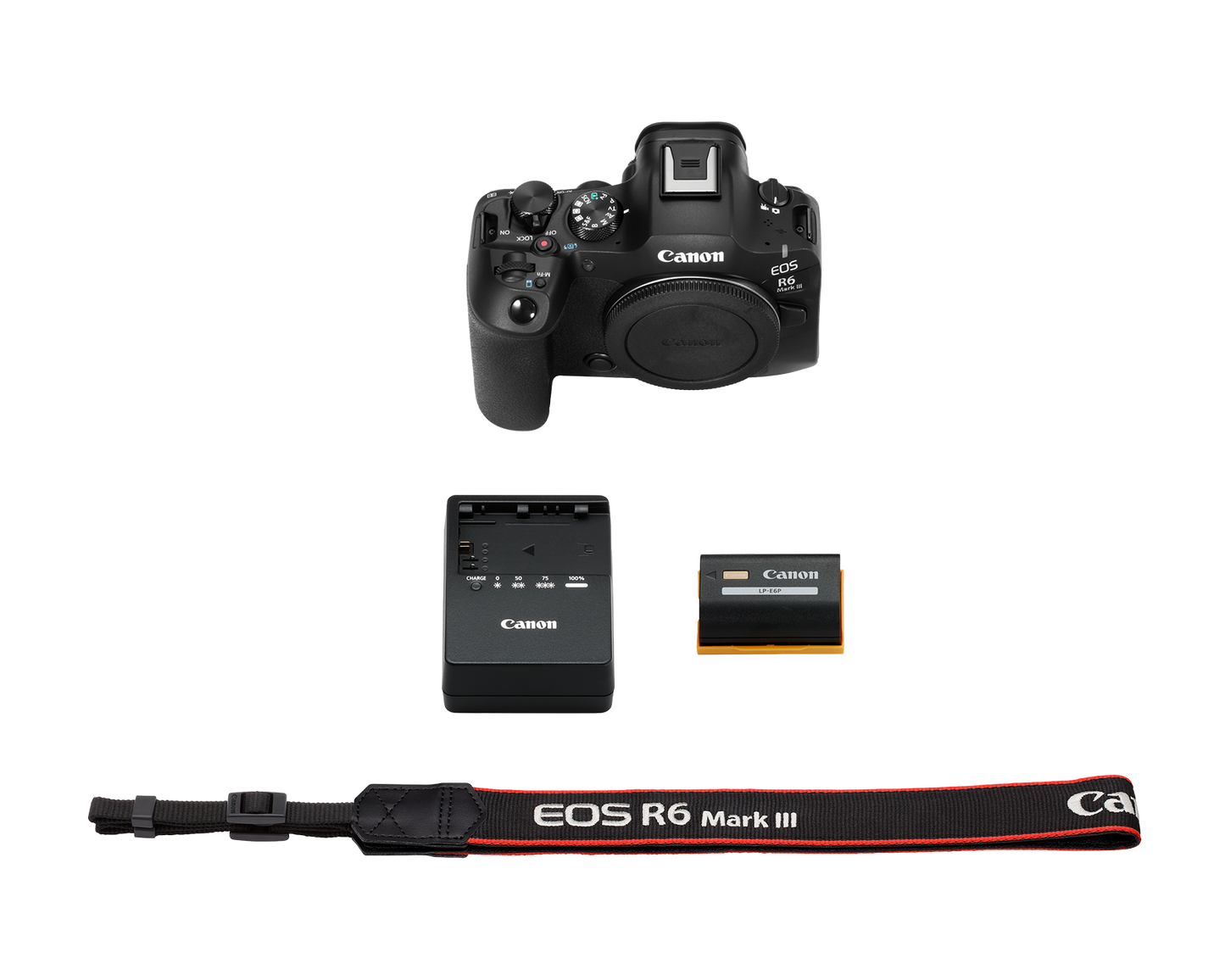
📦 In the Box
-
Canon EOS R6 Mark III camera body
-
R-F-5 camera body cap
-
LP-E6P rechargeable battery pack
-
LC-E6 battery charger
-
Battery pack cover
-
ER-EOSR6 Mark III neck strap
-
Multi-Function Shoe cover
Lens and memory cards are sold separately.
🔗 Complete Your Kit
Choose an RF lens suited to your work, then add a high-performance CFexpress Type B card for 7K RAW recording and a fast UHS-II SD card for secondary storage. Spare LP-E6P batteries, a CFexpress reader and a protective camera bag are strongly recommended for professional assignments.
With its 32.5MP full-frame sensor, 40 fps shooting, pre-continuous capture, advanced subject recognition, internal 7K RAW video and powerful stabilization, the Canon EOS R6 Mark III is a true next-generation hybrid camera.