Canon
Canon RF 5.2mm F2.8 L Dual Fisheye Lens
Canon RF 5.2mm F2.8 L Dual Fisheye Lens
Couldn't load pickup availability
✔ Full Manufacturer Warranty Included
✔ Ships Fast & Securely from Alabama
✔ Questions? Call (334) 821-2524
Canon RF 5.2mm F2.8 L Dual Fisheye Lens
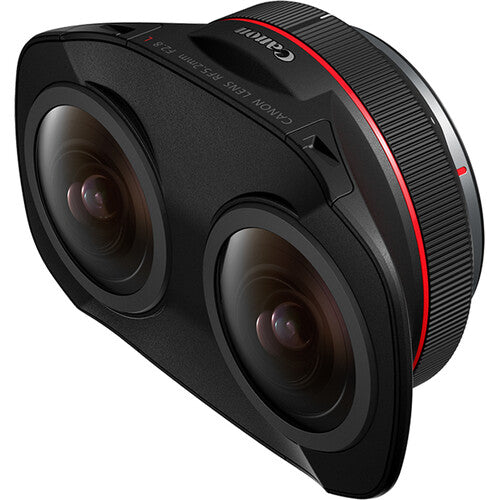
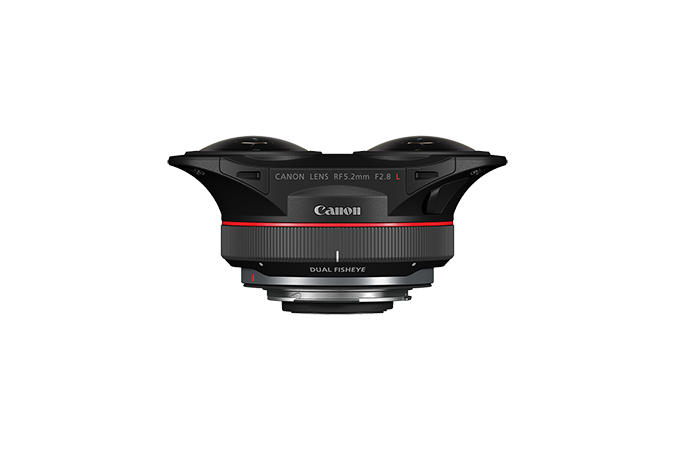
The Canon RF 5.2mm F2.8 L Dual Fisheye is a specialized professional lens for capturing stereoscopic 3D 180° virtual-reality photographs and video with compatible full-frame EOS R and Cinema EOS cameras.
Its two synchronized fisheye optical systems record left- and right-eye images side by side on a single camera sensor and into a single file. This eliminates the need to align two separate cameras or synchronize multiple recordings, greatly simplifying professional VR capture and post-production.
⭐ Key Benefits
-
Captures stereoscopic 3D 180° VR content
-
Two matched 5.2mm fisheye optical systems
-
Records both views to one full-frame sensor
-
Produces a single synchronized image or video file
-
Exceptional 190° optical field of view
-
Natural 60mm interpupillary distance
-
Bright f/2.8 maximum aperture
-
Professional Canon L-series construction
-
Two UD elements in each optical system
-
Manual focus with left/right calibration
-
Rear gelatin-filter holder
-
Weather-resistant construction
-
Compact 12.4-ounce design
-
Designed for the Canon EOS VR System
🥽 Stereoscopic 3D 180° VR Capture
The lens records separate left-eye and right-eye views with natural parallax. After conversion through Canon’s EOS VR workflow, the resulting content can be experienced as immersive stereoscopic 180° VR.
When viewed through a compatible headset, viewers can look around the recorded environment while perceiving depth and dimensionality.
It is ideal for:
-
Immersive documentary filmmaking
-
Tourism and destination experiences
-
Education and training
-
Museums and cultural preservation
-
Real-estate presentations
-
Live performances
-
Entertainment
-
Medical and technical demonstrations
-
Virtual tours
-
VR storytelling
👀 Natural 60mm Interpupillary Distance
The centers of the two lenses are separated by 60mm, approximating the distance between human eyes.
This spacing creates natural stereoscopic parallax, allowing compatible viewing systems to present convincing depth. Subjects close to the camera appear more dimensional, while distant scenes retain a broad sense of scale and environment.
For comfortable VR, subjects should generally not be positioned extremely close to the lens. Excessive near-field parallax can be difficult for viewers to fuse naturally.
🌐 Expansive 190° Field of View
Each fisheye system provides an approximately 190° field of view.
The additional coverage beyond 180° gives Canon’s VR software sufficient image area for alignment and conversion into a finished stereoscopic 180° equirectangular presentation.
Everything in front of and slightly beside the camera may appear in the recorded image. Crew members, lights, microphones, stands and the operator must therefore be positioned carefully.
📷 Two Images on One Sensor
Traditional stereoscopic VR rigs often use two cameras, introducing several production challenges:
-
Camera synchronization
-
Exposure matching
-
White-balance matching
-
Lens alignment
-
Focus matching
-
Multiple media cards
-
Separate audio and video files
-
Complex stitching
The RF 5.2mm Dual Fisheye records both circular views simultaneously on one sensor. Both perspectives share the same exposure, white balance, frame timing and recording file.
This significantly streamlines capture and post-production.
🎥 High-Resolution VR Production
Recording resolution and frame-rate options depend on the connected camera.
Selected combinations can provide:
-
High-resolution 8K capture
-
High-frame-rate 4K or 8K recording
-
Canon RAW or Cinema RAW Light workflows
-
10-bit Canon Log recording
-
High-resolution VR still photography
-
Professional color-grading flexibility
The EOS R5 C can record high-resolution VR footage at up to 8K DCI 60p in supported modes, while the original EOS R5 supports up to 8K DCI 30p. Newer compatible cameras may provide additional formats and frame-rate options.
📋 Compatible Cameras
The RF 5.2mm Dual Fisheye requires a supported full-frame camera and appropriate firmware. A camera having an RF mount does not automatically mean it supports this lens’s VR workflow.
Compatible models include selected cameras such as:
-
Canon EOS R5
-
Canon EOS R5 C
-
Canon EOS R5 Mark II
-
Canon EOS R6 Mark II
-
Canon EOS R8
-
Canon EOS C50
-
Canon EOS C80
-
Canon EOS C400
Available resolutions, frame rates, monitoring tools and software features vary significantly between cameras. Current firmware and exact workflow compatibility should be verified before purchase.
APS-C EOS R cameras use Canon’s RF-S 3.9mm Dual Fisheye system rather than this full-frame lens.
🌙 Bright F2.8 Maximum Aperture
The f/2.8 maximum aperture helps capture VR content in interiors and lower-light environments.
The aperture adjusts electronically from f/2.8 through f/16, giving creators control over exposure and depth of field. Because VR viewers may examine many areas of the scene, sufficient depth of field and careful focus are often more important than an extremely shallow-focus appearance.
✨ Professional L-Series Optics
Each of the two optical systems uses 12 elements arranged in ten groups, including two Ultra-low Dispersion elements.
The matched optical designs help maintain consistent:
-
Sharpness
-
Color
-
Contrast
-
Distortion characteristics
-
Chromatic-aberration control
-
Flare behavior
Canon’s Subwavelength Structure and Super Spectra coatings help reduce ghosting and flare in backlit environments.
🎯 Coordinated Manual Focusing
The lens is manual focus only. Autofocus is not supported.
Turning the main focus ring adjusts both optical systems together. Compatible cameras can provide tools such as:
-
Focus peaking
-
Magnified viewing
-
Focus Guide
-
Left/right image switching
-
VR framing overlays
These tools help the operator evaluate each fisheye view and achieve accurate focus.
⚖️ Left/Right Focus Calibration
An adjustment mechanism allows the right optical system to be fine-tuned relative to the left using the included 1.5mm hex wrench.
This adjustment is intended to correct a small focus difference between the two views—not to establish completely different focus distances.
Calibration should be performed carefully using the instructions and magnified camera display. Once matched, normal focusing is completed with the main focus ring.
🪟 VR Monitoring Tools
Compatible camera firmware can provide specialized monitoring aids, including Canon’s “Magic Window” overlay.
Depending on the camera, available aids may include:
-
Central framing reference
-
Left/right image switching
-
Magnified manual-focus inspection
-
Focus peaking while magnified
-
Equirectangular preview
-
Remote monitoring support
These features are camera- and firmware-dependent.
💻 Canon EOS VR Workflow
The dual circular images require conversion before they can be viewed as conventional stereoscopic 180° VR.
Canon provides two principal workflow options:
EOS VR Utility
A standalone application that can:
-
Recognize compatible lens metadata
-
Convert dual-fisheye recordings
-
Produce equirectangular 3D 180° content
-
Process supported stills, video and RAW formats
-
Export files for editing and VR playback
EOS VR Plug-in for Adobe Premiere Pro
The plug-in allows compatible footage to be converted within an Adobe Premiere Pro workflow, reducing the need to prepare every clip separately beforehand.
Software compatibility, subscription requirements, supported codecs and computer requirements should be confirmed before production.
🎬 Post-Production Is Required
Footage directly from the camera displays two circular fisheye images side by side. It is not immediately ready for normal VR-headset viewing.
A complete production workflow generally includes:
-
Capture with a compatible camera and firmware.
-
Import files into supported Canon VR software.
-
Convert the dual-fisheye image to an equirectangular VR format.
-
Edit and color-grade the converted footage.
-
Add the correct stereoscopic VR metadata.
-
Export for a compatible headset, application or hosting platform.
Customers should plan for the required computer performance, storage capacity and software before beginning a large VR project.
🎙️ Plan Audio Separately
The RF 5.2mm captures visual information only. Immersive productions often benefit from spatial or ambisonic audio recorded using separate equipment.
Because the camera sees nearly everything in front of it, microphones and stands must be positioned carefully or concealed within the scene.
🔲 Keep the Camera Level
A properly leveled and stable camera produces a more comfortable VR experience.
Recommended support includes:
-
Sturdy tripod
-
Leveling base
-
Compact tripod head
-
Monopod or narrow support with a small visual footprint
-
Remote start and monitoring
Camera movement should be smooth and deliberate. Fast rotation, heavy vibration and handheld walking can cause discomfort when viewed through a headset.
🔍 7.9-Inch Minimum Focusing Distance
The lens focuses as close as approximately 0.2m, or 7.9 inches.
However, placing an important subject extremely close to either lens can create uncomfortable stereoscopic disparity. The minimum technical focusing distance should not automatically be treated as the ideal subject distance for VR.
Testing the intended viewing experience is important before final production.
🧩 Rear Gelatin-Filter Holder
A built-in rear holder accepts properly prepared gelatin filters.
This provides filtration without placing anything in front of the two protruding fisheye elements. The holder can be useful for exposure or color-control materials designed for rear installation.
Filters must be cut and installed according to Canon’s specifications to avoid interfering with the mount or optical path.
🌦️ Professional L-Series Construction
Dust- and water-resistant sealing helps protect the lens during challenging assignments.
Fluorine coatings on the exposed front surfaces resist oil and fingerprints and make cleaning easier. The lens remains weather resistant rather than waterproof.
The two exposed fisheye elements require careful handling because front protective filters and conventional lens hoods cannot be used.
📋 Technical Specifications
| Specification | Details |
|---|---|
| Lens mount | Canon RF |
| Intended format | Full-frame |
| Focal length | Dual 5.2mm |
| Primary purpose | Stereoscopic 3D 180° VR |
| Optical field of view | Approximately 190° |
| Interpupillary distance | 60mm |
| Maximum aperture | f/2.8 |
| Minimum aperture | f/16 |
| Optical construction | 12 elements in 10 groups per lens |
| Special elements | 2 UD elements per lens |
| Aperture blades | 7 per optical system |
| Minimum focusing distance | 0.2m / 7.9 in |
| Maximum magnification | 0.03x |
| Focusing | Manual only |
| Autofocus | Not supported |
| Image stabilization | Not provided |
| Rear filter support | Built-in gelatin-filter holder |
| Weather resistance | Yes |
| Dimensions | Approximately 121.1 × 83.6 × 53.5mm |
| Weight | Approximately 350g / 12.4 oz |
| RF extender compatibility | No |
📸 Ideal For
-
Professional VR filmmakers
-
Immersive documentary production
-
Tourism and destination marketing
-
Museums and cultural organizations
-
Educational institutions
-
Medical and technical training
-
Real-estate VR presentations
-
Live-performance capture
-
Virtual experiences
-
Commercial VR production
-
Content designed for compatible headsets
-
Creators building an EOS VR workflow
🆚 RF 5.2mm Dual Fisheye vs RF-S 3.9mm Dual Fisheye
| Feature | RF 5.2mm F2.8 L | RF-S 3.9mm F3.5 |
|---|---|---|
| Intended sensor | Full-frame | APS-C |
| Maximum aperture | f/2.8 | f/3.5 |
| Optical field of view | Approximately 190° | Approximately 144° capture coverage |
| Focus | Manual | STM-supported focusing |
| Construction | Professional L-series | Compact RF-S |
| Best suited to | Professional high-resolution VR | Accessible APS-C VR creation |
Choose the RF 5.2mm for professional full-frame VR production and maximum immersive coverage. Choose the RF-S 3.9mm when working with a supported APS-C camera and a more accessible content-creation workflow.
🆚 Dual Fisheye Lens vs Two-Camera VR Rig
| Feature | RF 5.2mm Dual Fisheye | Traditional Two-Camera Rig |
|---|---|---|
| Sensors | One | Two |
| Files per take | One primary image/video file | At least two |
| Frame synchronization | Automatic | Must be managed |
| Exposure matching | Automatic | Must be matched |
| Optical alignment | Fixed lens design | Requires rig calibration |
| Setup size | Compact | Generally larger |
| Workflow | Canon EOS VR conversion | Custom stitching and synchronization |
| Rig flexibility | Fixed 60mm spacing | Potentially adjustable |
The Canon system dramatically simplifies production. A multi-camera rig may provide more customization but requires substantially more setup and post-production expertise.
🆚 180° VR vs 360° VR
The RF 5.2mm creates stereoscopic 180° VR rather than full 360° capture.
180° VR Advantages
-
High detail concentrated in the forward viewing hemisphere
-
Natural stereoscopic depth
-
Crew and equipment can remain behind the camera
-
Simpler lighting and production control
-
Strong fit for guided storytelling
360° VR Advantages
-
Viewer can look in every direction
-
Better suited to completely explorable environments
-
Requires hiding or removing crew and equipment on all sides
The RF 5.2mm is ideal when immersive depth and forward-directed storytelling are more important than complete spherical coverage.
📦 In the Box
-
Canon RF 5.2mm F2.8 L Dual Fisheye Lens
-
Canon Lens Cap 5.2
-
Canon RF Rear Lens Dust Cap
-
Canon LS1014 Lens Case
-
1.5mm Hex Wrench for Left/Right Focus Adjustment
-
Manufacturer documentation
🎒 Recommended Kit Additions
Consider pairing this lens with:
-
Compatible full-frame Canon EOS R or Cinema EOS camera
-
Current camera firmware
-
Canon EOS VR Utility or EOS VR Plug-in workflow
-
High-capacity, high-speed memory cards
-
High-performance editing computer
-
Fast external storage
-
Compact, sturdy tripod
-
Leveling base
-
Remote camera control
-
Spatial or ambisonic audio recorder
-
VR headset for reviewing finished content
-
Air blower and lens-safe cleaning supplies
🏬 Why Buy from Cameragraphics?
Cameragraphics is an authorized Canon dealer staffed by professional imaging specialists who can help confirm camera, firmware and software compatibility before purchase.
We can help assemble the complete capture, storage, support and post-production system required for professional Canon EOS VR production.
Cameragraphics — Serving Auburn Since 1974.